
Class Register · by SmartClass AI Academy
The class register that does the counting for you
Class Register is the cloud version of the paper register your teachers already know. Teachers mark attendance on a phone, tablet or computer. Totals, percentages and summaries work themselves out.
Pupils, teachers and classes are unlimited on every plan.
Why schools choose it
Everything a paper register does, without the adding up
Class Register keeps the layout your teachers know and takes over the work that used to take days at the end of term.
Same layout as the paper register
Morning and afternoon marks for Present, Absent and Late, with weekends and holidays greyed out automatically.
Totals worked out for you
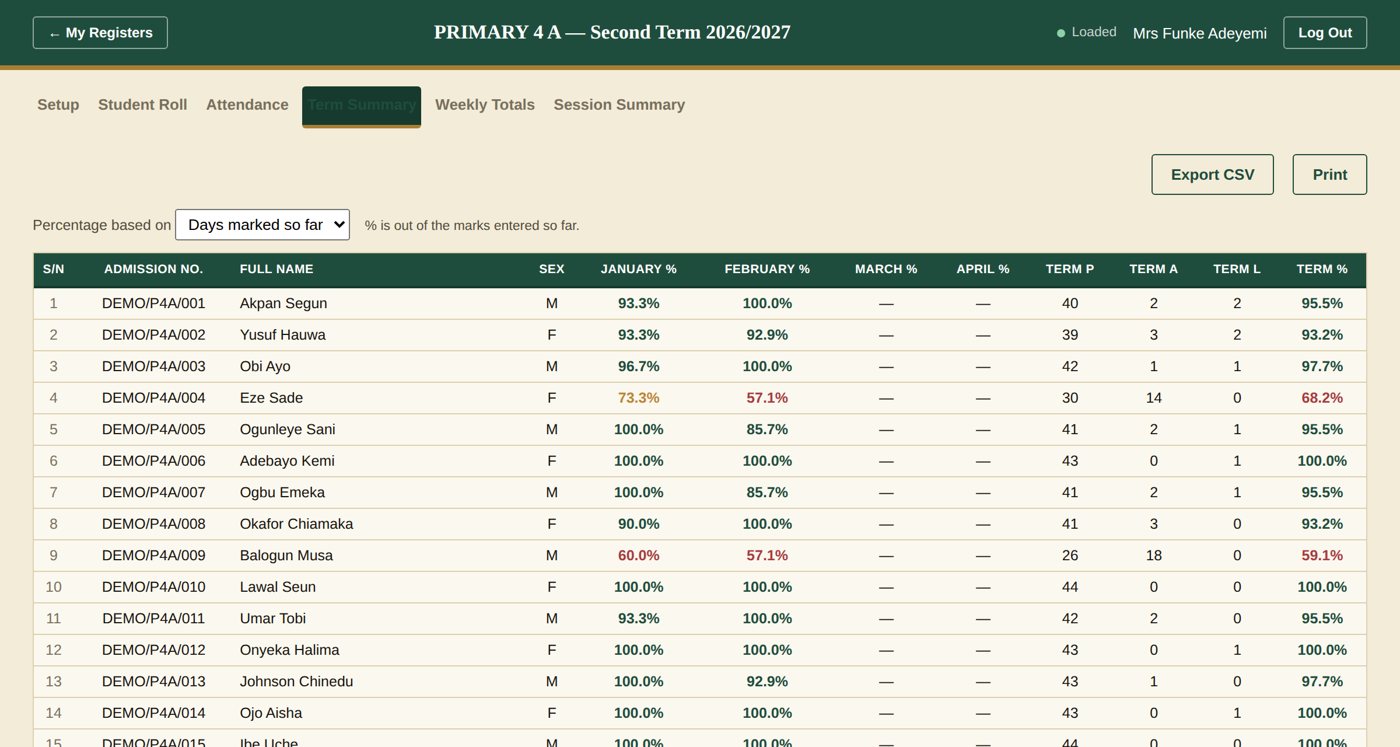
Weekly totals, monthly and term summaries, session summaries, attendance percentages, and boys and girls figures.
Print in the format you know
Every tab prints cleanly, with signature blocks for the Class Teacher, Head Teacher and Officer, and exports to CSV.
Safe in the cloud
Records are stored securely, backed up automatically, and available on any phone, tablet or computer with internet.
Built for the whole school
Head Teacher supervision, administrator titles and permissions, several campuses, and your school logo on the login page.
Easy at the end of the session
All three terms live in one register. At the end of the session, send pupils up to their new class in a few clicks.
See it working
Real screens, from a sample school
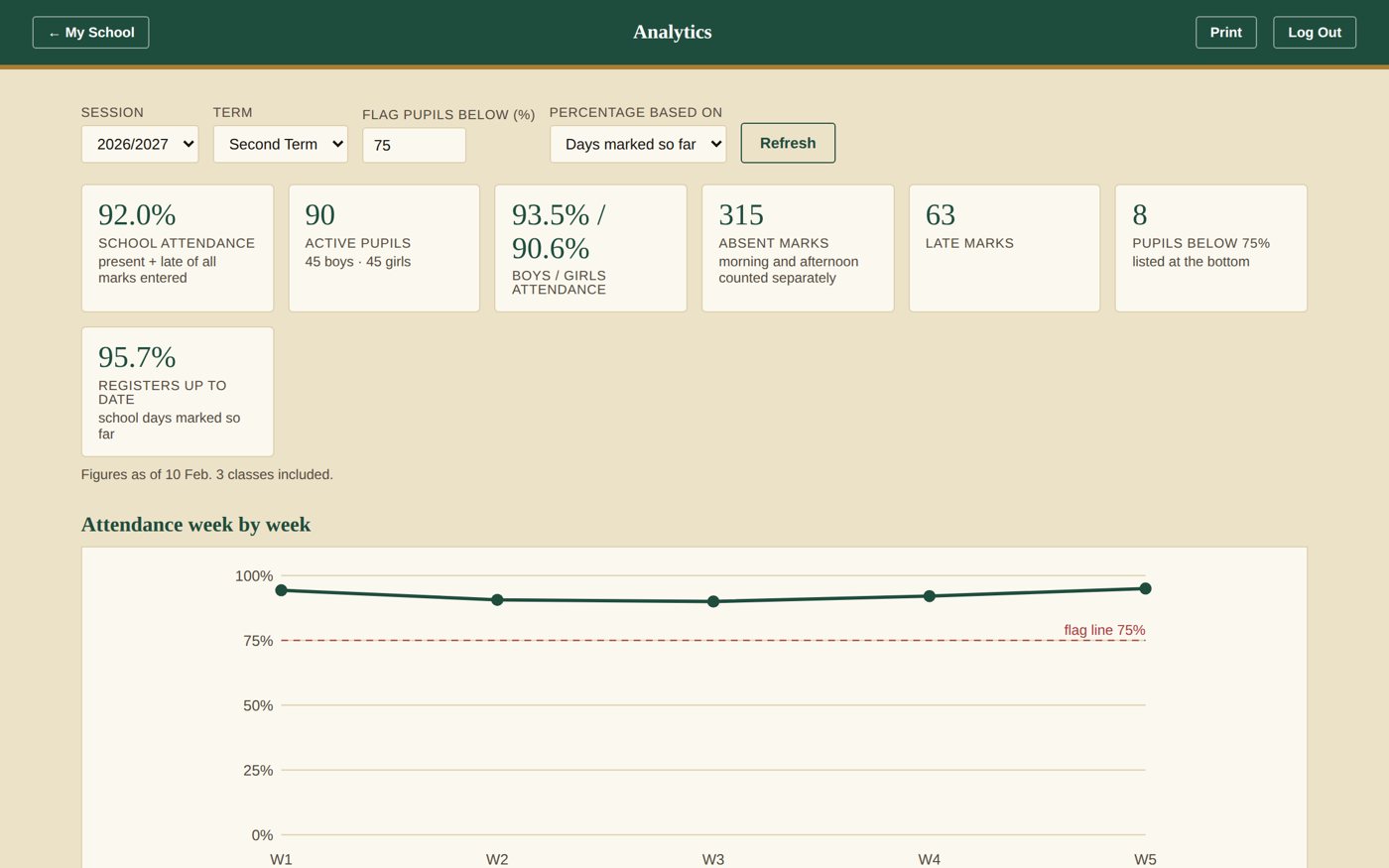
These screens use made-up pupils. Your own school's data is private to your school.
How it works
From paper to printed in three steps
We do the setup with you, so your teachers can start marking from the first day.
We set up your school
Your account, classes, teachers and administrators, pupils and logo. We train your staff and support the go-live.
Teachers mark every day
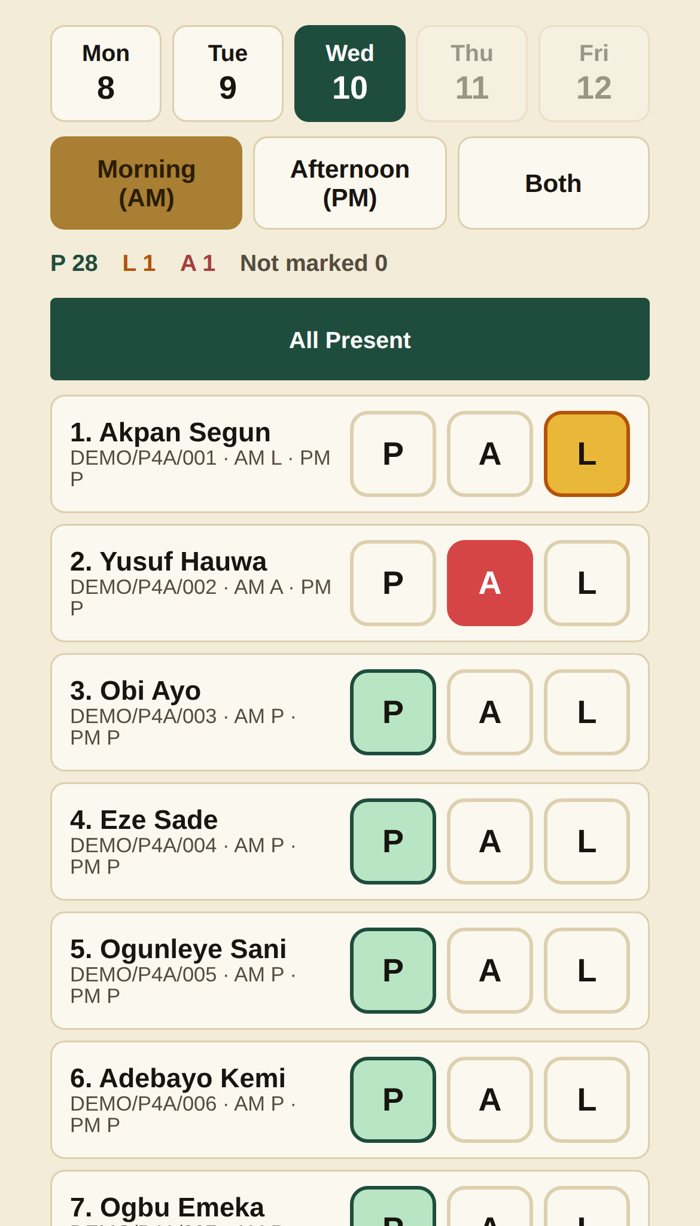
On a phone, tap the day, then tap P, A or L next to each name. On a computer, use the full table.
Totals work themselves out
Check the summaries, sign the register and print it in the format you already use.
Made for every role
Useful from the classroom to the proprietor's desk
Class teachers
- Mark a whole day Present in one click, then change the absentees
- Mark with big buttons on a phone
- See term totals and percentages instantly
- Print the register for your records
Head teachers and administrators
- See every class register from one screen
- Sign off registers and approve new teachers
- Give each administrator the permissions they need
- Attendance analytics on Premium plans and above
Proprietors
- One system for every class and every campus
- Any plan, whatever your size
- Unlimited pupils, teachers and classes
- Your data stays yours, and can be exported
Plans and prices
Five plans. Any school size.
You pay per pupil, per term, plus a one-time setup fee. Choose any plan, whatever the size of your school.
| Plan | Per pupil, per term | One-time setup fee | Administrators | Analytics |
|---|---|---|---|---|
| Basic | ₦1,500 | ₦100,000 | 1 | No |
| Standard | ₦2,000 | ₦150,000 | 3 | No |
| Premium Includes Analytics | ₦2,500 | ₦200,000 | 5 | Yes |
| Enterprise | ₦3,000 | ₦250,000 | As agreed for your school | Yes |
| Enterprise Unlimited | ₦3,500 | ₦250,000 | No limit | Yes |
Billing: the subscription is charged on the pupils registered at the start of each term. The setup fee covers your school account, logo, classes, teacher and administrator accounts, pupil import, roles, testing, staff orientation, training and go-live support. On-site training and the typing or cleaning of pupil lists are quoted separately. Prices are in Nigerian Naira.
Questions
What schools ask us
Do we need internet?
Yes. Class Register works in the cloud, so your school needs internet access or mobile data, and a phone, tablet or computer.
Can teachers use phones?
Yes. On a phone, the Attendance tab opens in a big-button Phone view: tap the day, choose morning, afternoon or both, then tap P, A or L next to each pupil.
Whose data is it, and is it safe?
The data belongs to your school. It is stored in the cloud, backed up automatically, and every table can be exported to CSV. Each school's information is kept separate from other schools.
How do we start?
Book a short demo. We then send a quotation and an onboarding form. Once the setup fee is paid, we set up your school, bring in your pupils, train your staff and support you on go-live.
How are we billed?
Per pupil, per term, on the pupils registered at the start of the term, plus a one-time setup fee. There is no charge for each teacher or class, because teachers and classes are unlimited.
We have more than one campus.
Locations are included in every plan, so each campus can have its own teachers and registers. Larger groups can ask us for a tailored quotation.
See Class Register working in 15 minutes
We will show you Class Register with a sample school, at a time that suits you.